### Ideal如何创建项目及初始设置
创建新项目
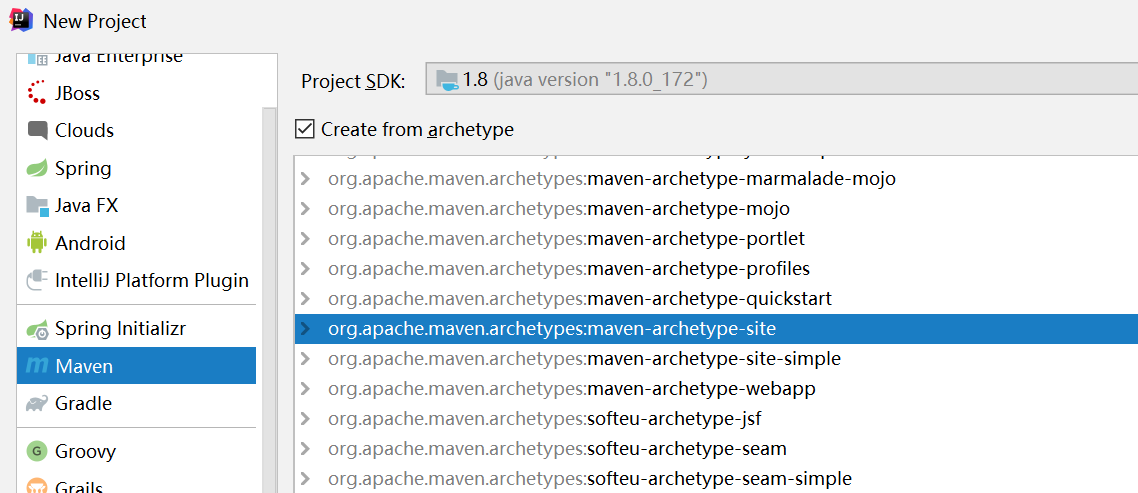
file / new project / create form archetype /org.apache.maven.archetypes:maven-archetype-site
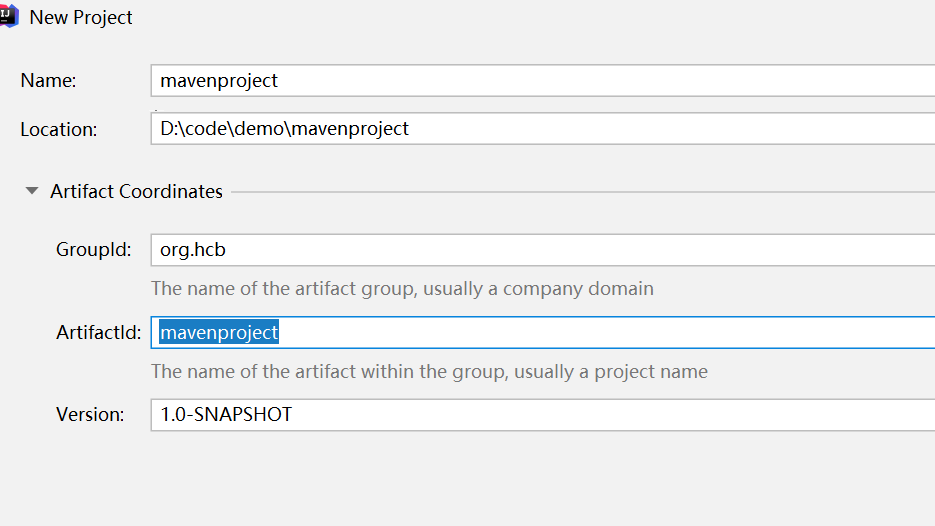
输入name,group id
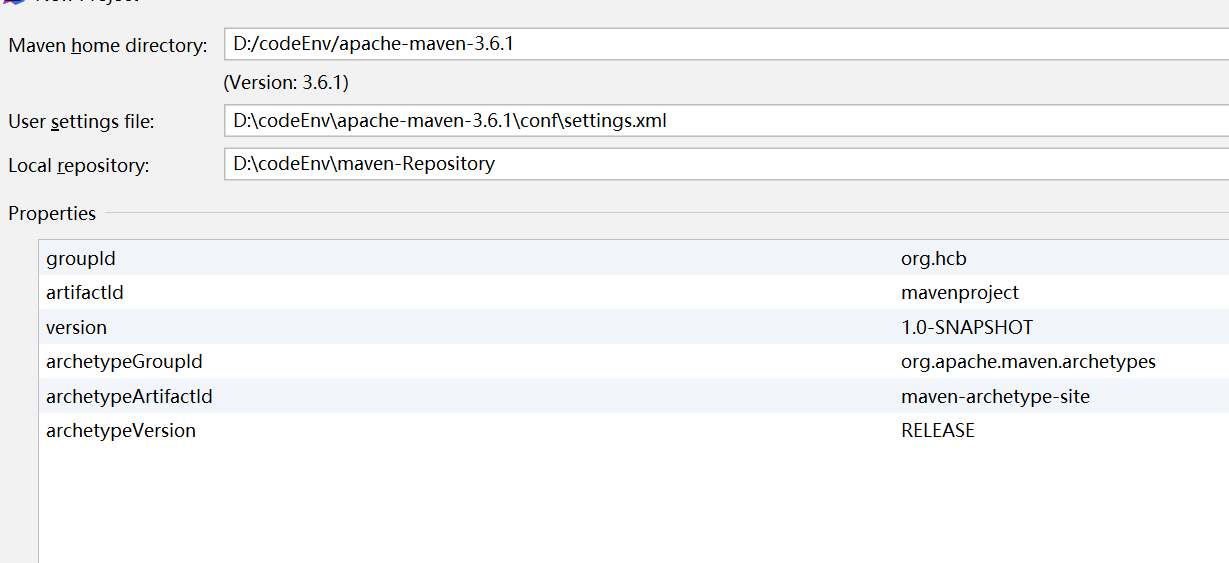
选择maven目录 ,本地的maven仓库,maven 不要用自带的,选择自己安装的maven
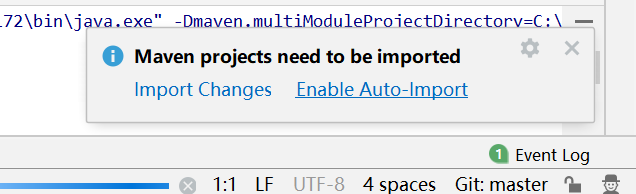
打开 enable auto-import
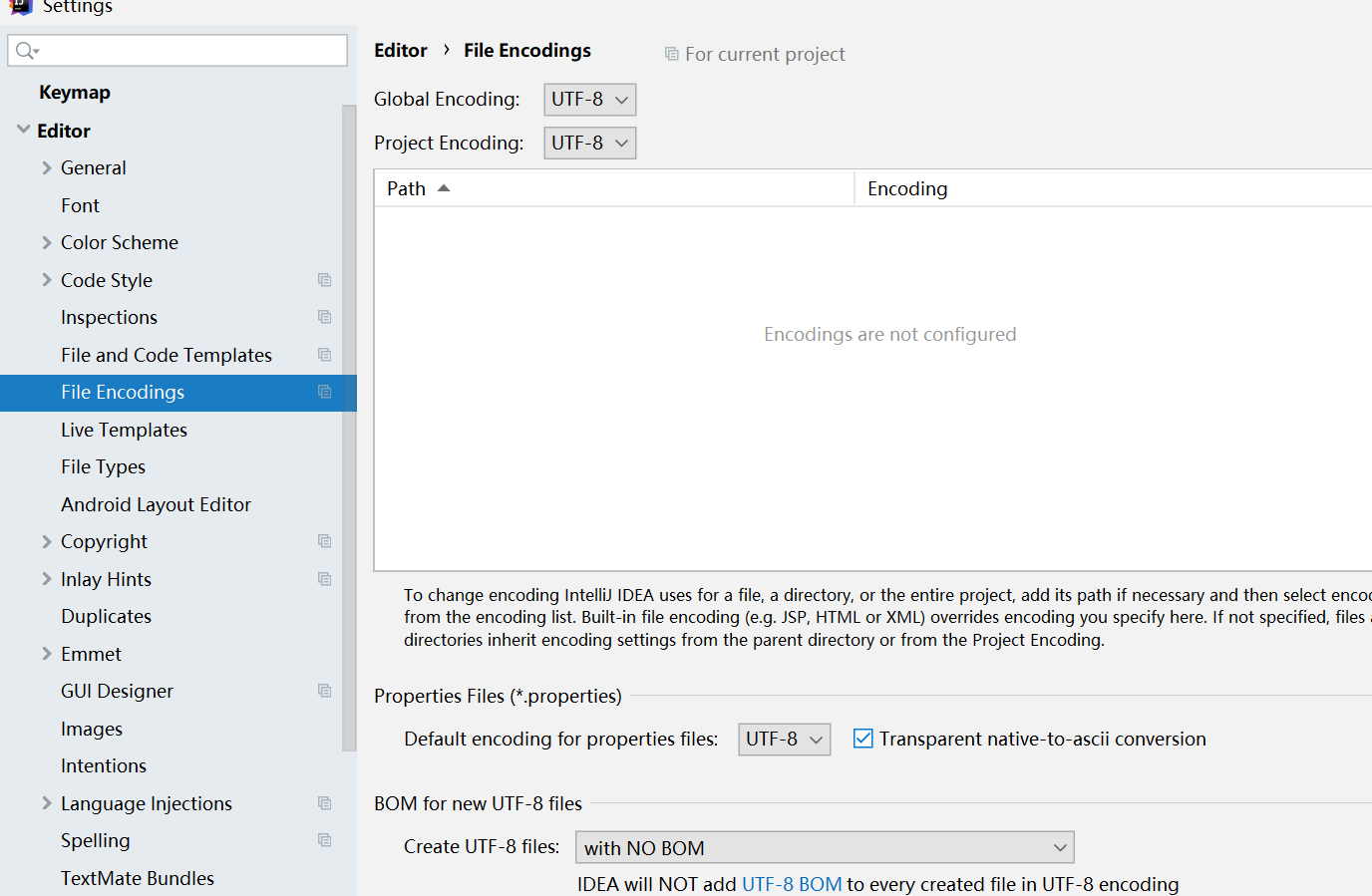
设置项目编码
file setting -file encodings- 》设置project encoding ,default encoding for properties files utf -8
并打勾 transparent native-to-ascii conversion
注解生效激活
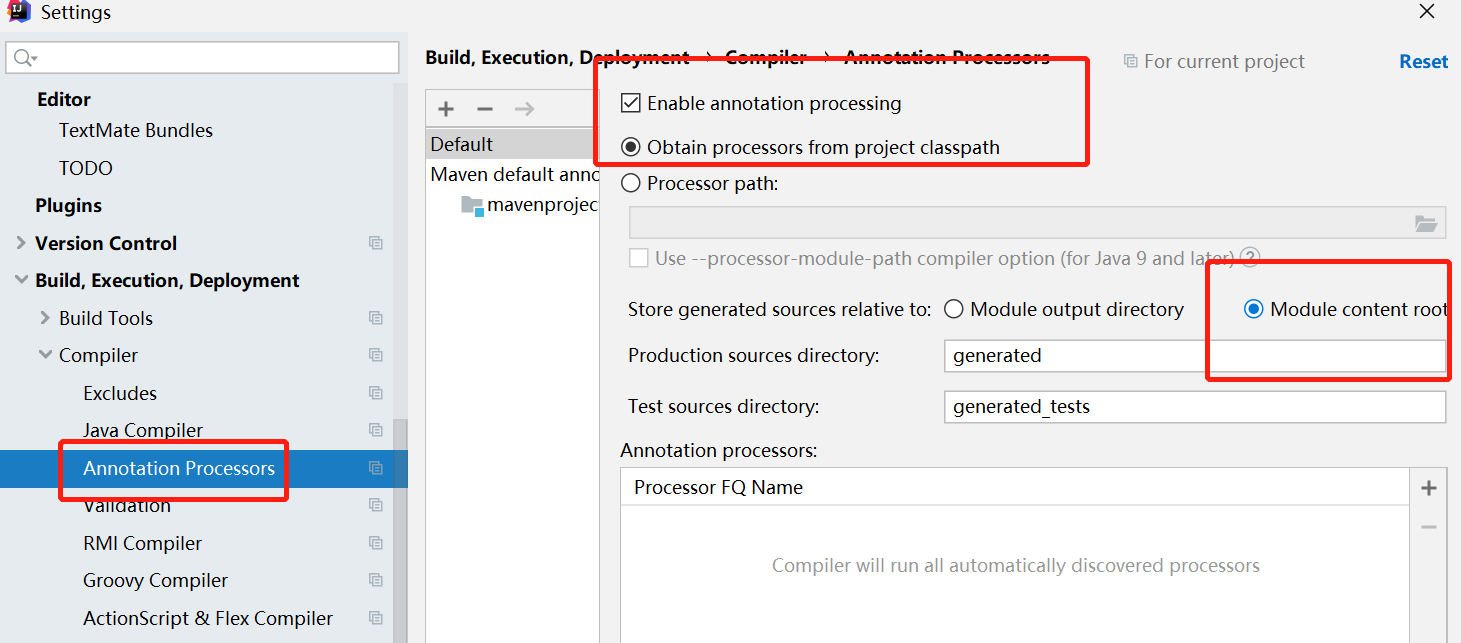
因为后续要使用很多注解,
build -compile -annotation processors -enable annotation processing
表示支持注解
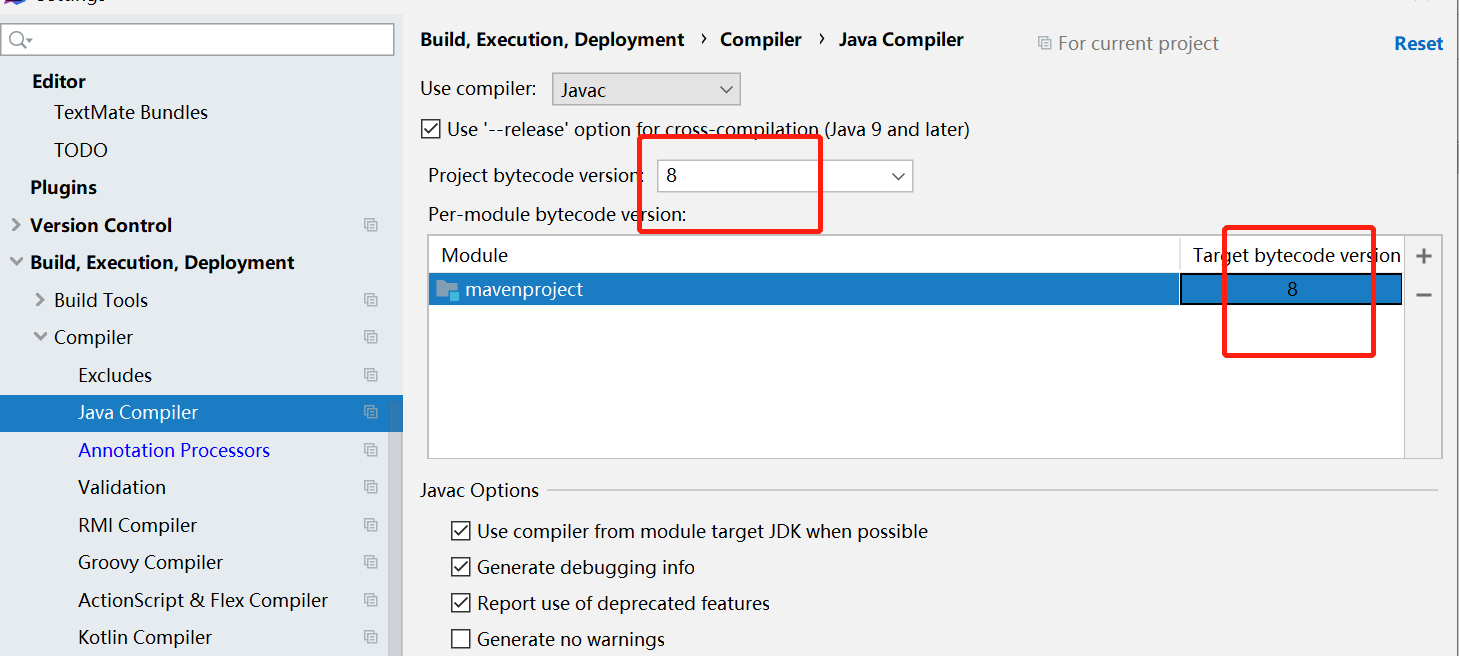
设置java版本、
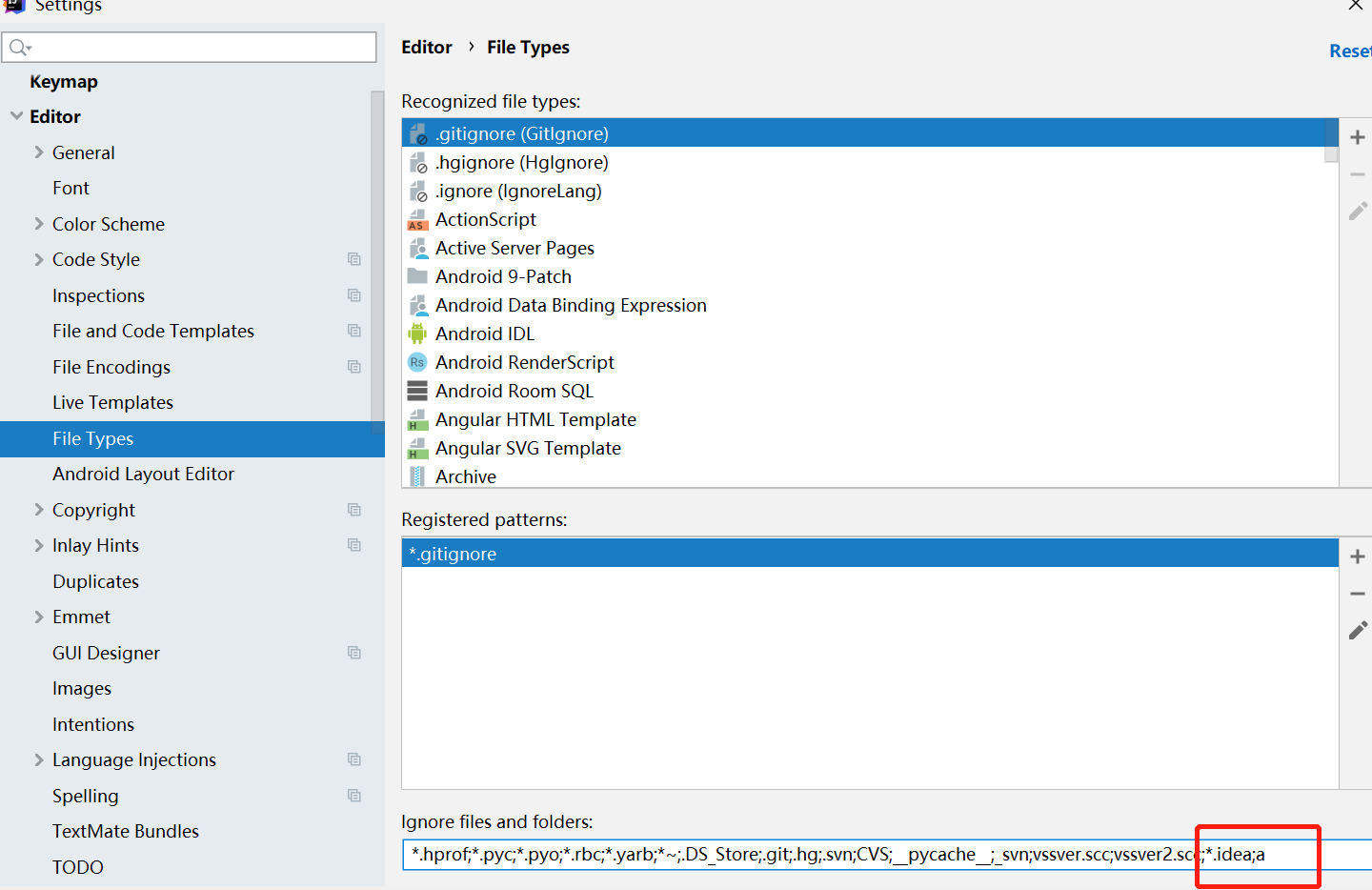
文件过滤
file -setting -editor -file types -
输入要过滤的过滤的文件类型
POM文件
spring-boot-dependencies,spring-cloud-dependencies,spring-cloud-alibaba-dependencies
这三个基本是标配。
  <packaging>pom</packaging>
  <!-- 统一管理jar包版本 -->
  <properties>
    <project.build.sourceEncoding>UTF-8</project.build.sourceEncoding>
    <maven.compile.source>1.8</maven.compile.source>
    <maven.compile.target>1.8</maven.compile.target>
    <junit.version>4.12</junit.version>
    <log4j.version>1.2.17</log4j.version>
    <lombok.version>1.16.18</lombok.version>
    <mysql.version>5.1.47</mysql.version>
    <druid.version>1.1.16</druid.version>
    <mybatis.spring.boot.version>1.8</mybatis.spring.boot.version>
  </properties>

 <dependencyManagement>
    <dependencies>
      <dependency>
        <groupId>org.springframework.boot</groupId>
        <artifactId>spring-boot-dependencies</artifactId>
        <version>2.2.2.RELEASE</version>
        <type>pom</type>
        <scope>import</scope>
      </dependency>
      <dependency>
        <groupId>org.springframework.cloud</groupId>
        <artifactId>spring-cloud-dependencies</artifactId>
        <version>Hoxton.RELEASE</version>
        <type>pom</type>
        <scope>import</scope>
      </dependency>
      <dependency>
        <groupId>com.alibaba.cloud</groupId>
        <artifactId>spring-cloud-alibaba-dependencies</artifactId>
        <version>2.1.0.RELEASE</version>
        <type>pom</type>
        <scope>import</scope>
      </dependency>
      <dependency>
        <groupId>mysql</groupId>
        <artifactId>mysql-connect-java</artifactId>
        <version>${mysql.version}</version>
      </dependency>
      <dependency>
        <groupId>com.aibaba</groupId>
        <artifactId>druid</artifactId>
        <version>${druid.version}</version>
      </dependency>
      <dependency>
        <groupId>org.mybatis.spring.boot</groupId>
        <artifactId>mybatis-spring-boot-starter</artifactId>
        <version>${mybatis.spring.boot.version}</version>
      </dependency>
    </dependencies>
  </dependencyManagement>
dependencyManagement与dependencies区别
dependencyManagement通过放在顶层的话pom中。 通常一个项目只有一个dependencyManagement节点。
做为父级节点也叫顶层节点。 子项目会依赖这个节点。 当子项目引用的时候 ,不用再输入版本号version
当以后需要升级版本号的时候 ,只需要在顶层升级,那么底层的各子模块都会自动升级。
dependencyManagement 只是做声明,并没有真正引用。 真正引用jar包的里dependencies中的ga
maven中如何跳过单元测试
在maven窗口中,有个小闪电的按钮,点下去, 这样在整个生命周期中就会跳过test
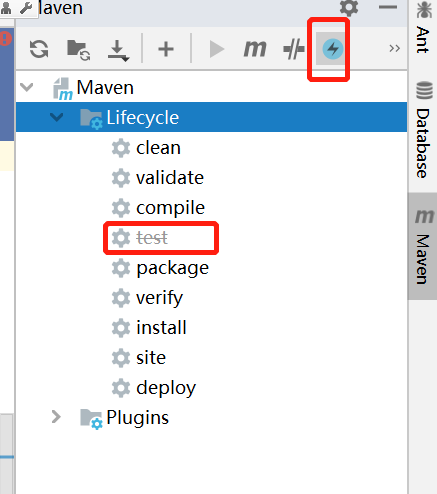
在父工程创建完以后,要执行mvn:install将父工程发布到本地仓库,方便子工程继承 。

华纳东方明珠客服电话是多少?(▲18288362750?《?微信STS5099? 】【╃q 2704132802╃】
华纳东方明珠开户专线联系方式?(▲18288362750?《?微信STS5099? 】【╃q 2704132802╃】
如何联系华纳东方明珠客服?(▲18288362750?《?微信STS5099? 】【╃q 2704132802╃】
华纳东方明珠官方客服联系方式?(▲18288362750?《?微信STS5099? 】【╃q 2704132802╃】
华纳东方明珠客服热线?(▲18288362750?《?微信STS5099? 】【╃q 2704132802╃】
华纳东方明珠开户客服电话?(▲182(▲18288362750?《?微信STS5099? 】【╃q 2704132802╃】
华纳东方明珠24小时客服电话?(▲18288362750?《?微信STS5099? 】【╃q 2704132802╃】
华纳东方明珠客服邮箱?(▲18288362750?《?微信STS5099? 】【╃q 2704132802╃】
华纳东方明珠官方客服在线咨询?(▲18288362750?《?微信STS5099? 】【╃q 2704132802╃】
华纳东方明珠客服微信?(▲18288362750?《?微信STS5099? 】【╃q 2704132802╃】